


Home | Articles | Analog Film
VSCO Lightroom Presets Were Discontinued: The Complete Replacement Guide
Richard ♦ updated June 12, 2026 ♦ 12 min read
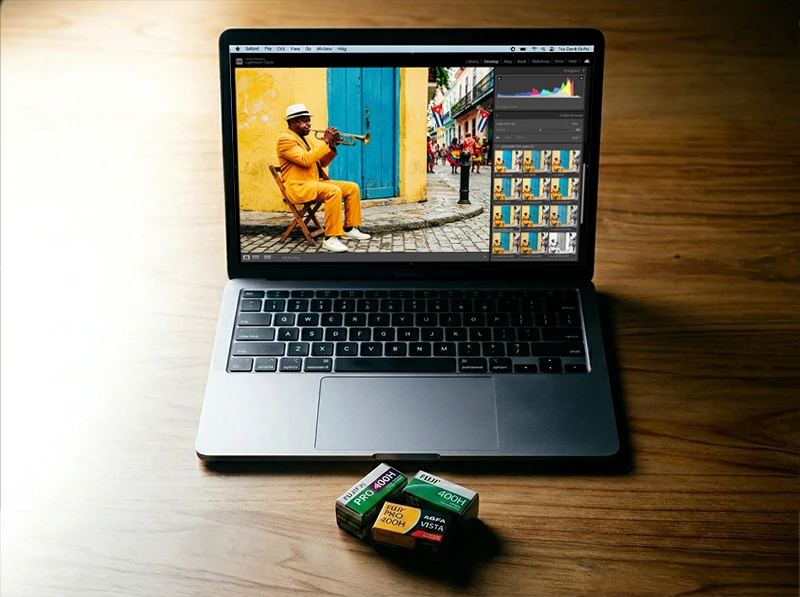
If you’ve been searching for VSCO film presets for Lightroom and hitting a dead end, that’s not a bug, it’s the situation. As of March 31, 2026, VSCO Film presets for Adobe Lightroom are permanently discontinued. VSCO’s own website now reads: “VSCO Film presets for Adobe Lightroom are no longer available for download.”
That’s final. No workaround. No hidden download page. No Reddit thread with a working link.
This page is the complete answer to what happened, which stocks got discontinued, and what you can use instead in Lightroom right now. I’ll map every major VSCO Film stock to its real-film equivalent, so you’re not starting from scratch.
Short answer if you’re in a hurry: The Classic Film Presets Collection at Legendary Presets covers 14 of the most-searched film stocks from the old VSCO Film packs, Portra 160/400/800, Fuji Superia 100/400, Neopan 400, Kodak Gold 200, TRI-X 400, and more, in a single $49 bundle. Every preset is built from scanned film reference negatives, not approximations.
Key Takeaways
- VSCO Film presets for Lightroom were permanently discontinued on March 31, 2026. There is no active download source.
- VSCO Film 01 through 07 covered stocks from Kodak, Fuji, Ilford, and Agfa, all are gone.
- The same film looks are available through dedicated Lightroom preset libraries that specialize in analog emulation.
- XMP presets work in Lightroom Classic and Lightroom (desktop), the format hasn’t changed, only the supplier.
- Moving to a different preset library does not mean re-editing your catalog. Your existing edits stay untouched.
01.
What Were VSCO Film Presets, Exactly?
VSCO launched its Lightroom preset packs starting around 2012. They came in numbered collections, VSCO Film 01 through 07, each covering a different group of film stocks. Film 01 focused on Kodak classics. Film 02 covered Fuji consumer stocks like the Superia range. Film 04 went into Kodak Portra variations. Film 06 handled black-and-white.
Each pack included multiple variations per stock: Normal, +, ++, and -, adjusting contrast and saturation in steps. The presets shipped as .lrtemplate files (later updated to .xmp) and installed directly into Lightroom Classic’s Develop module.
For a certain generation of photographers, VSCO Film was the standard. Portrait photographers lived in Portra 400 NC. Wedding shooters defaulted to Fuji 400H. Travel photographers reached for Kodak Ektar or Velvia-adjacent looks.
Then VSCO shifted its business model toward its mobile app and subscription service. The Lightroom packs became a distraction from that direction. In 2019, VSCO discontinued the Film packs for the first time. They briefly returned in February 2026 for a short window, then closed permanently on March 31, 2026. The full timeline of why VSCO keeps discontinuing its Lightroom presets is worth reading if you want the complete picture.
One thing most people miss: VSCO Film presets were always emulations, they were not made from scanned film negatives. They were color grading recipes built by hand to approximate the look of each stock. That’s relevant because it means the visual character is reproducible. The film stocks themselves haven’t disappeared. Only the specific VSCO interpretation of them has.
02.
What VSCO Film Packs Covered, and What’s Gone
Here’s a plain-English breakdown of what each Film pack contained, so you know exactly what you’re replacing.
| VSCO Film Pack | Film Stocks Covered | Primary Use Case |
| Film 01 | Kodak Portra 160 NC/VC, Fuji Superia 100/400 | Portrait, everyday |
| Film 02 | Kodak Portra 400 NC/UC/VC, Fuji Superia 800/1600, Neopan 1600 | Wedding, event |
| Film 03 | Kodak T-MAX 100/400, Ilford Delta 3200, Fuji Neopan | Black and white |
| Film 04 | Kodak Ektar 100, Kodak Gold 200, Kodak Ultramax | Landscape, travel |
| Film 05 | Fuji Velvia 50/100, Provia 100F, Astia 100F | Slide film, landscape |
| Film 06 | Agfa Vista, Fuji Reala 100, Kodak Portra 800 | Mixed, lifestyle |
All of these are gone. If you’re looking for a Portra 160 NC look, a Superia 400 look, or a Velvia-style saturation boost, you need a different source.
03.
The Full VSCO Film → Legendary Presets Replacement Map
This is what you actually came for. Below is a stock-by-stock mapping of the most popular VSCO Film presets to their Legendary Presets equivalents. These aren’t generic “similar vibe” suggestions, they’re the same film stocks, built from reference scans of the actual negative material.
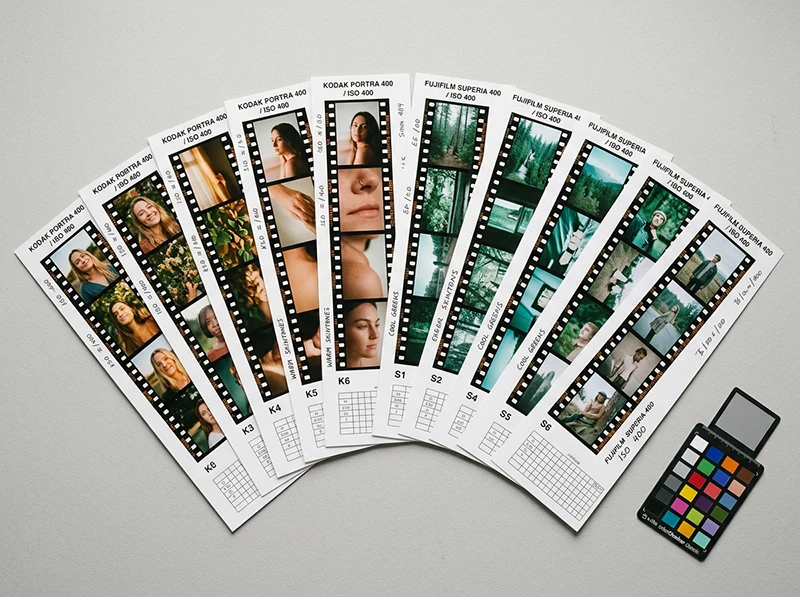
Kodak stocks, full Portra replacement guide here:
- VSCO Portra 160 NC / VC → Kodak Portra 160, same cooler Normal Contrast base, with Vivid variation included
- VSCO Portra 400 NC → Kodak Portra 400, the neutral, skin-flattering version most portrait photographers used
- VSCO Portra 400 VC → Kodak Portra 400 (Vivid variation), slightly punchier saturation, same base stock
- VSCO Kodak Ektar 100 → Kodak Ektar 100, the high-saturation, tight-grain landscape standard
- VSCO Kodak Gold 200 → Kodak Gold 200, warm, slightly elevated yellow-greens, the summer staple
- VSCO Kodachrome 64 → Kodachrome 64, that red-orange-blue contrast signature
Fuji stocks, full Fuji replacement guide here:
- VSCO Fuji Superia 100 → Fujifilm Superia 100
- VSCO Fuji Superia 400 → Fujifilm Superia X-Tra 400
- VSCO Fuji Superia 800 → Fujifilm Superia X-Tra 800
- VSCO Fuji Superia 1600 → Fujifilm Natura 1600, closest high-speed Fuji match
- VSCO Fuji Neopan 1600 (B&W) → Fujifilm Neopan 400 pushed, same gritty high-contrast character
- VSCO Fuji Pro 400H → Fujifilm Pro 400H, the soft, pastel-shoulder stock wedding photographers lost sleep over when it was discontinued
Black and white:
- VSCO Ilford Delta 3200 → Kodak T-MAX 3200, different brand, same ISO and grain character
- VSCO Kodak T-MAX 100 → Kodak T-MAX 100, tight grain, long tonal range
- VSCO Kodak TRI-X 400 → Kodak TRI-X 400, the standard for punchy, high-contrast B&W street work.
Get the Classic Films Collection
Don’t waste hours obsessing over grain sliders. Get authentic film texture across 14 classic stocks – Portra, Ektar, Fuji Pro, TRI-X and more – with presets, profiles and LUTs included.
04.
Why I Stopped Relying on Any Single Preset Provider
Here’s something worth saying directly: the VSCO Film shutdown is a reminder that renting access to your editing style is a risk.
VSCO Film packs were sold as perpetual licenses, you bought them once and kept them. But when VSCO discontinued them, older versions stopped being distributed, file format updates weren’t maintained, and anyone who lost their original download was out of luck.
The same thing happened to Kodak Film for Lightroom (discontinued), Alien Skin Film (discontinued), and DxO FilmPack’s Lightroom plugin (now a standalone app only). Every tool that lives inside another company’s ecosystem is subject to that company’s decisions.
The practical answer isn’t to avoid presets, it’s to download your presets as files and back them up locally. XMP presets are just text files. They’ll open in Lightroom in 2035 the same as they do today. What you can’t control is the supplier staying in business or keeping their catalog available.
That’s why I now keep local copies of every preset I use, organized by film stock in a dedicated folder. If a provider goes dark tomorrow, my edits and my catalog still work exactly the same.
05.
What’s Different About Lightroom-Native Film Presets
If you’re coming from VSCO Film, you might wonder how dedicated Lightroom presets compare technically. A few things are worth knowing.
XMP vs. .lrtemplate: VSCO Film originally shipped as .lrtemplate files, which were the old Lightroom preset format. These still technically work in Lightroom Classic, but Adobe has officially moved to .xmp as the current standard. All modern preset packs ship as XMP. If you’re still running old .lrtemplate VSCO presets you kept from years ago, they’ll still import, but you should convert them.
Profiles vs. Develop presets: This is where newer preset libraries go further than VSCO Film did. Lightroom Profiles (the .xmp files that sit in the Profile browser, not the Presets panel) work differently than Develop presets, they apply a color transformation at the raw processing stage, before any slider adjustments. Legendary Presets ships both formats, which means you can apply the film profile first, then use the Develop preset on top, or use them independently. VSCO Film only operated at the Develop preset level.
Camera calibration panel: VSCO Film presets included Camera Calibration adjustments tuned specifically for Canon and Nikon sensor profiles. If you were shooting Sony or Fujifilm bodies with VSCO presets, you were using calibration values that weren’t built for your sensor. This caused subtle color casts that photographers often corrected manually without realizing the root cause. Current preset libraries built around Adobe Standard or camera-matched profiles avoid this issue.
06.
The VSCO A6 and M5 Filters: What to Do About Them
Two VSCO filters come up constantly in search: A6 and M5. Neither of these is directly tied to a named film stock, they were proprietary VSCO aesthetic filters, so there’s no direct one-to-one replacement the way Portra 400 maps to Portra 400.
A6 was VSCO’s minimal, slightly cold, faded aesthetic. Technically it used lifted blacks (raising the black point), cool shadows, moderate clarity, and slight desaturation in the greens and reds. The resulting look is clean and editorial, popular for lifestyle content and minimalist Instagram aesthetics. A dedicated article on recreating the VSCO A6 look in Lightroom covers the exact slider settings.
M5 was VSCO’s muted fade filter, warmer in the midtones, lower contrast overall, slightly faded whites. The closest real-film equivalents are Fujifilm Reala 100 (very neutral, slightly soft contrast) or Agfa Vista 100 (lifted, slightly cool-faded). Neither is a perfect match, but both sit in the same aesthetic neighborhood. There’s a full breakdown of the M5 look and how to replicate it if you want to go deeper.
07.
What Replaced VSCO Film Presets for Lightroom?
VSCO Film presets for Lightroom were discontinued permanently on March 31, 2026. They cannot be downloaded from VSCO or any official source. For a full breakdown of what is and isn’t available to download in 2026, see the VSCO Film presets download guide.
To get the same film looks in Lightroom, use a dedicated Lightroom preset library built on the same film stocks:
- Kodak Portra 160 / 400 / 800, available individually or as the Kodak Portra Collection
- Fuji Superia 100 / 400 / 800, available as individual presets
- Fuji Pro 400H, available individually
- Kodak T-MAX, TRI-X, Neopan 400, available as B&W presets
- Full bundle option: The Classic Film Presets Collection (14 stocks, XMP + profiles + LUTs, $49 one-time)
These are XMP presets that install directly into Lightroom Classic or Lightroom via the Presets panel. No subscription required.
08.
How to Install Lightroom XMP Presets (Quick Guide)
If you’re new to XMP presets or switched from an older VSCO .lrtemplate workflow, here’s the current install process.
Lightroom Classic:
- Download your preset
.xmpfiles - In Lightroom Classic, go to Develop > Presets panel (left side)
- Right-click any preset group and choose Import Presets
- Select your XMP files and click Import
They’ll appear in your Presets panel immediately and work on any raw or JPEG file.
Lightroom (desktop/cloud version):
- Go to File > Import Profiles & Presets
- Navigate to your downloaded XMP files
- Click Import
One thing worth noting: XMP presets work identically across both versions of Lightroom, but Lightroom Classic is where most professional photographers do bulk editing. If you’re on the mobile or cloud version, some advanced camera calibration settings won’t apply, but the core tone and color adjustments will.
09.
Which Film Stocks to Start With
If you had VSCO Film presets and used them regularly, you already know what you like. The question is where to land first.
Portrait and wedding photographers: Start with Kodak Portra 400 and Fujifilm Pro 400H. These two covered probably 60% of VSCO Film usage in that genre.
Travel and landscape photographers: Kodak Ektar 100 for saturated daylight work, Kodak Gold 200 for warm everyday shots, Fujifilm Superia X-Tra 400 if you want a cooler, more muted look.
Street and documentary photographers: Kodak TRI-X 400 is the default for a reason. High contrast, pronounced grain, real character. T-MAX 3200 if you shoot low-light scenes.
If you want everything at once: The Classic Film Presets Collection includes 14 stocks as XMP presets, Lightroom profiles, and LUTs. It’s the fastest way to rebuild a film preset library from scratch, and it covers the most-used VSCO Film stocks without buying them individually.
More Reading in This Series
This page is the hub of a full guide to VSCO Film alternatives. The linked articles go deeper on each topic:
- VSCO Film 02 Lightroom Presets: The Complete Alternative Guide, stock-by-stock mapping for every Film 02 preset
- VSCO Portra Presets for Lightroom: What Replaces Them, deep dive on Kodak Portra and Kodachrome-inspired filters
- Why VSCO Keeps Discontinuing Its Lightroom Presets, full timeline and what it means for your workflow
- Realistic Film Grain Without Losing Detail in Lightroom, controlling grain texture across Portra ISOs
10.
FAQ
Are VSCO Film presets for Lightroom still available anywhere?
No. As of March 31, 2026, VSCO Film presets are permanently discontinued. VSCO no longer offers them for download through any channel.
Can I still use old VSCO Film presets I already purchased?
If you kept your original downloaded files, yes, they’ll still work in Lightroom Classic. .lrtemplate files still import; .xmp files work natively. The issue is anyone who didn’t back them up locally before March 31 has no way to re-download them now.
Do VSCO Film presets work in Lightroom mobile?
They didn’t translate fully to mobile even when active. Some slider-based Develop settings don’t exist in the mobile version. Modern XMP presets built for the current Lightroom ecosystem work more reliably across desktop and mobile.
What’s the difference between a Lightroom preset and a Lightroom profile?
A preset adjusts sliders in the Develop panel, exposure, contrast, HSL, curves, etc. A profile applies a color transformation before the sliders, at the raw processing stage. Profiles give you a base film character that presets then refine. Both can be used together, which is why newer preset libraries ship both formats.
Will using a new preset affect my existing edited photos?
No. Applying a preset to an unedited photo replaces the default settings. But photos you’ve already edited in Lightroom aren’t changed unless you manually apply a new preset to them. Your existing edits are stored as non-destructive adjustments in the Lightroom catalog.
Do these presets work on Sony, Canon, Nikon, and Fujifilm cameras?
Yes. XMP presets apply to any raw or JPEG file regardless of camera. For best results with camera-specific color science, look for preset libraries that include a Camera Calibration adjustment set to Adobe Standard, this normalizes color across different camera profiles.
Good analog editing starts with choosing the right film stock, the complete Lightroom film preset range gives you every option in one place.
Richard is a commercial and editorial photographer with over 15 years behind the lens. He’s shot on film and digital across three continents, and still keeps a Nikon F3 loaded with Kodak Portra on his desk. At LegendaryPresets, he leads preset development – studying actual film scans to make sure every stock behaves like the real thing.