


Home | Articles | Adobe Lightroom
Lightroom and Photoshop Pricing: The Real Cost Breakdown
Richard ♦ updated July 14, 2026 ♦ 9 min read

You’re not just paying for two apps. You’re paying for a bundle tier, an annual commitment, and (until recently) a fee Adobe didn’t clearly disclose if you tried to leave early.
This guide breaks down what each subscription tier actually includes, how Adobe’s pricing got here, and the cancellation cost most comparison articles skip entirely. For the app comparison itself, see Lightroom vs Photoshop: Which One Do You Actually Need?
Key Takeaways
- Adobe’s cheapest plan cost USD 9.99/month from 2013 until January 2025, when it jumped
- Three tiers exist: Lightroom only cost USD 11.99/month, Photography Plan with Photoshop cost USD 19.99/month, Creative Cloud Pro Plan cost USD 69.99/month. Almost every plan requires an annual commitment, even the ones billed monthly
- New subscribers can no longer get the old 20GB entry-level plan at any price
- Canceling early triggers an Early Termination Fee, now legally required to be disclosed upfront
- Prepaying annually is almost always cheaper than paying monthly on the same plan
01.
The Lightroom and Photoshop Subscription, Broken Down
Adobe doesn’t sell Lightroom or Photoshop as standalone purchases anymore. Both live inside Creative Cloud subscription tiers, and which tier you pick determines what you get and what you pay.
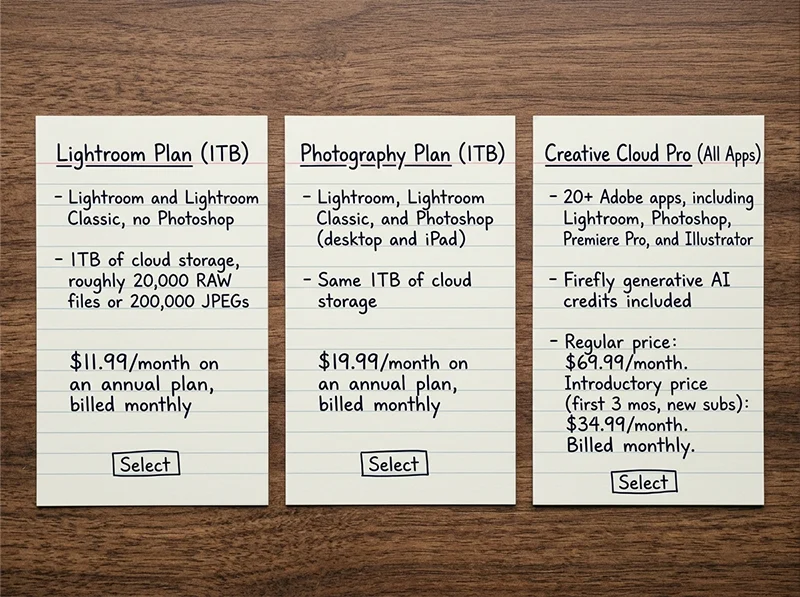
Lightroom Plan (1TB):
- Lightroom and Lightroom Classic, no Photoshop
- 1TB of cloud storage, roughly 20,000 RAW files or 200,000 JPEGs
- $11.99/month on an annual plan, billed monthly
Photography Plan (1TB):
- Lightroom, Lightroom Classic, and Photoshop (desktop and iPad)
- Same 1TB of cloud storage
- $19.99/month on an annual plan, billed monthly
Creative Cloud Pro (All Apps):
- 20+ Adobe apps, including Lightroom, Photoshop, Premiere Pro, and Illustrator
- Firefly generative AI credits included
- $69.99/month regularly, often discounted to $34.99/month for new subscribers’ first three months
Source: Adobe Creative Cloud Photography plan comparison, retrieved July 2026.
We build our film-emulation presets at Legendary Presets for the Lightroom Plan and Photography Plan tiers specifically, since that’s what almost every photographer running a preset workflow actually owns.
02.
Adobe’s Pricing History: How We Got Here
The current pricing didn’t happen overnight. Here’s the timeline that got Adobe from $9.99 a month to where it is now:
- September 2013: Adobe launches the original Photography Plan at $9.99/month, bundling Lightroom and Photoshop for the first time (PetaPixel first documented the launch price in September 2013).
- 2013 to 2024: The $9.99/month price holds steady for over a decade on the entry-level 20GB storage tier, becoming the default recommendation across the photography industry.
- January 15, 2025: Adobe discontinues the 20GB Photography Plan for new subscribers entirely. Existing subscribers on the monthly billing option see their price jump from $9.99 to $14.99/month, a 50 percent increase. Annual prepaid subscribers stay locked at $119.88/year, unchanged (source: PetaPixel).
- January 2025 onward: New customers can only choose the Photography (1TB) Plan, starting at $19.99/month or $239.88/year, roughly double the old entry price.
- 2026: Creative Cloud Pro climbs to $69.99/month regularly, up from $59.99/month in late 2024, an increase of about 17 percent in under two years.
The pattern is consistent: storage tiers get bigger, feature bundles get wider, and the price floor keeps rising. The $9.99 era is gone and isn’t coming back for new subscribers.

My pro tip: If you’re already grandfathered onto an older, cheaper plan, don’t downgrade or cancel to “save money” temporarily. You can’t buy your way back into a discontinued tier once you leave it.
03.
The Hidden Cost Nobody Mentions: The Early Termination Fee
Here’s what most pricing guides leave out entirely: almost every Adobe photography plan, even the ones billed monthly, is actually a 12-month contract in disguise.
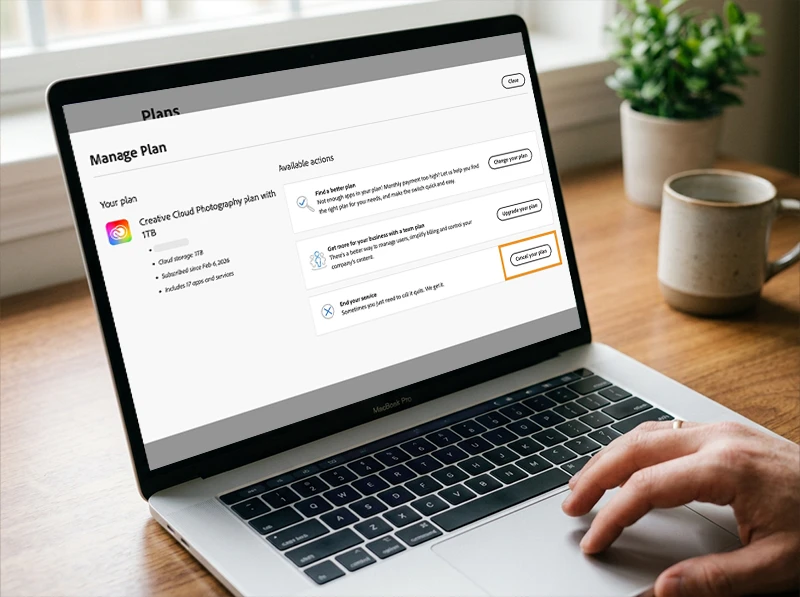
Cancel before your annual term ends and Adobe charges an Early Termination Fee, roughly half of whatever you’d owe for the rest of the year. For a long time, Adobe buried this fee in fine print and inconspicuous hyperlinks, and made the cancellation process itself deliberately hard to finish.
That changed in March 2026. The U.S. Department of Justice announced a $150 million settlement with Adobe over these exact practices: $75 million in civil penalties and $75 million in free services to affected customers, resolving allegations that Adobe violated the Restore Online Shoppers’ Confidence Act (source: U.S. Department of Justice, “Adobe Agrees to $150 Million Settlement“, March 13, 2026, retrieved July 2026).
The settlement didn’t remove the Early Termination Fee. It just forces Adobe to tell you about it clearly before you sign up, and to make canceling genuinely simple. The fee itself is still very real if you break an annual commitment early.
- Before you subscribe: check the exact fee calculation Adobe now must disclose at checkout
- If you’re on a free trial longer than 7 days: Adobe must now remind you before it converts to a paid plan with an Early Termination Fee attached
- If you need to cancel: the process is required to be simpler than it was before March 2026, though the fee itself still applies
04.
Which Tier Is Actually Worth It for a Preset Workflow
For most photographers running a Lightroom-first, preset-driven edit, the Lightroom Plan at $11.99/month covers everything: full Develop module access, Lightroom Classic, and preset support across desktop and mobile.
Add the Photography Plan’s extra $8/month only if you genuinely need Photoshop for compositing, heavy retouching, or design work. That decision is covered in full in Lightroom vs Photoshop: Which One Do You Actually Need?, including exactly how the two apps hand off files once you own both.
Creative Cloud Pro rarely makes sense unless you’re already using other Adobe apps like Premiere Pro or Illustrator for non-photography work. Paying $69.99/month for 20 apps to access two of them is the most common overpay we see among our customers.
If you’re actively moving files between Lightroom and Photoshop, or applying presets across both apps, the practical mechanics of that workflow (and where the subscription tier actually matters) are covered in Using Lightroom and Photoshop Together: How It Works.
The Lightroom and Photoshop subscription runs $11.99/month for Lightroom alone or $19.99/month for both apps together (Photography Plan, annual billing). Nearly every plan requires a 12-month commitment, even when billed monthly, and canceling early triggers an Early Termination Fee that Adobe must now disclose upfront under a March 2026 federal settlement.
05.
Lightroom and Photoshop Subscription Tiers at a Glance
| Tier | Price (annual, billed monthly) | Best For |
| Lightroom Plan (1TB) | $11.99/month | Preset-driven editing, no Photoshop needed |
| Photography Plan (1TB) | $19.99/month | Most working photographers who need both apps |
| Creative Cloud Pro | $69.99/month | Photographers also using Premiere, Illustrator, or other CC apps |
06.
FAQ
Can I buy Lightroom without a subscription?
No. Adobe hasn’t sold a one-time-purchase version of Lightroom since it confirmed Lightroom 6 as the last perpetual license in October 2017. Every current option, including the cheapest Lightroom-only plan, is a recurring subscription.
Is the Photography Plan cheaper than buying Lightroom and Photoshop separately?
Yes, by a wide margin. Photoshop alone costs $22.99/month on its own annual plan. The Photography Plan gets you Photoshop plus all of Lightroom for $19.99/month, less than Photoshop by itself.
What happens to my photos if I cancel my subscription?
Your local files and any presets you’ve applied stay on your hard drive exactly as edited. You lose access to cloud-synced photos, Lightroom Classic’s Develop module, and any Creative Cloud-only features once the subscription ends.
Does the monthly price actually mean no commitment?
No. “Monthly” billing on Adobe’s photography plans still locks you into a 12-month term. Only the true month-to-month option, at a higher price, lets you cancel anytime without an Early Termination Fee.
Is annual prepaid always the better deal?
For most people, yes. Paying the full year upfront costs less overall than the same plan billed monthly, and it’s the only way to fully avoid any risk of a mid-term price increase on your current term.
Prepaying annually on the Lightroom Plan is the lowest-friction way to lock in a stable price for a Lightroom-first, preset-driven workflow. Ready to put that subscription to work? Start with the Kodak Portra Preset Collection and see how far your current plan actually takes you.
Related Articles
- Lightroom vs Photoshop: Which One Do You Actually Need?
- Using Lightroom and Photoshop Together: How It Works
- Can You Use Lightroom Presets in Photoshop?
- Lightroom vs Lightroom Classic: Which One Do You Actually Need?
- The Best Lightroom Presets for Photographers in 2026
Richard is a commercial and editorial photographer with over 15 years behind the lens. He’s shot on film and digital across three continents, and still keeps a Nikon F3 loaded with Kodak Portra on his desk. At LegendaryPresets, he leads preset development – studying actual film scans to make sure every stock behaves like the real thing.