


Home | Articles | Adobe Lightroom
Best Lightroom Presets for Portrait Photography in 2026
Richard ♦ updated July 5, 2026 ♦ 13 min read

The best portrait preset is not the one that looks most dramatic in a preview thumbnail. It is the one that handles skin tones correctly across the full range of your lighting conditions, golden hour, open shade, overcast, indoor window light, and artificial light, without requiring a different fix on every image.
Film stocks were chemically engineered for exactly this. Kodak’s Portra range was designed for professional portrait and wedding work over two decades. Fuji’s Pro series was built for fashion and editorial skin rendering. Those stocks became the standard for portrait photography because they solved real problems: how to keep warm skin from going orange, how to retain highlight detail in bright light, how to lift shadows without losing depth.
This guide covers every portrait-relevant film preset in the Legendary Presets range, organized by the situations where each one works best.
Key Takeaways
- Kodak Portra 400 is the default choice for most portrait situations, warm, forgiving, designed for skin tones
- Fujifilm Pro 400H is the better choice when shooting in shade or overcast light, cooler character prevents the grey cast that Portra can develop in cool light
- Kodak Portra 160 is underused, its finer grain and slightly cooler tone than 400 make it ideal for high-key and studio portraits
- Portra 800 is a portrait preset, not just a low-light preset, its grain character flatters skin in difficult mixed light
- The Agfa Portrait XPS 160 is the most underrated portrait preset in the collection, designed specifically for portrait skin rendering, often outperforms Portra in cool or diffused light
- Matching the preset to your light matters more than any other single decision in portrait editing
01.
Why Film Stocks Make Better Portrait Presets
Most portrait presets are built around what looks good, warm tones, lifted shadows, soft contrast. Film stock presets are built around what was tested on actual skin across decades of professional use.
The difference shows up in the details:
- Tone curve shape. Film negative curves roll off highlights gradually rather than clipping them. In a portrait, this means bright areas on skin, foreheads, cheekbones, shoulders in direct light, retain texture rather than going white and flat.
- HSL calibration. Film stocks were calibrated to specific color responses that keep orange and red channels from oversaturating skin. A preset built from actual film data has these relationships built in. A generic “warm portrait” preset typically just pushes the orange channel up until it looks warm, which oversaturates quickly.
- Shadow lifting. The shadow character of film stocks is specific, lifted but not grey, with a color tint that adds depth rather than reducing contrast to nothing. This is why film-based portrait presets feel more three-dimensional than generic warm filters.
02.
Best Lightroom Presets for Portraits by Light Condition
Golden Hour and Warm Natural Light
First choice: Kodak Portra 400
Portra 400 is the standard for a reason. In warm light it produces exactly what portrait photographers want: skin tones that are warm without going orange, highlights that roll off without clipping, shadows that lift naturally without going grey. It handles backlit subjects particularly well, the lifted shadow detail prevents faces from going dark when the background is bright.
✅ Use it on: outdoor sessions in golden hour, backlit portraits, lifestyle shoots in warm afternoon light, family sessions in any warm natural light.
Adjust after applying: almost nothing on a well-exposed image. Drop Temperature 100K if shooting in strong direct sun to prevent orange push.
Second choice: Kodak Portra 800
Portra 800 is not just for low light. Its higher-ISO character gives it slightly more contrast and visible grain than 400, which works well on portraits where you want more presence and drama in the image. In warm golden light the extra contrast creates a moodier result than 400’s softer character.
✅ Use it on: portraits with a strong mood or editorial feel, golden hour shoots where you want more drama, lifestyle work that should feel warmer and more textured.

Open Shade and Diffused Natural Light
First choice: Fujifilm Pro 400H
Open shade is cool and flat. Portra 400 in open shade can look slightly grey because its warmth is calibrated for warm light, in cool diffused light, the preset does not have warm light to work with and the skin can look desaturated. Pro 400H was built for exactly this condition. Its pastel, slightly cool character works with diffused light rather than against it.
✅ Use it on: outdoor portraits in open shade, covered outdoor spaces, north-facing natural light, any session where the light is cool or flat.
Adjust after applying: if shooting near golden hour (warm light near shade), push Temperature 100 to 150K warmer. Pro 400H is calibrated for neutral to cool light and needs a small warmth correction in warm conditions.
Second choice: Agfa Portrait XPS 160
This stock is consistently overlooked. Agfa designed it specifically for portrait photography, not as a general-purpose film, but as a dedicated portrait emulsion. Its skin rendering in diffused light is exceptional: neutral without going grey, soft without losing contrast, and with a color response that flatters a wide range of skin tones. In cool, diffused light it often outperforms both Portra and Pro 400H.
✅ Use it on: studio portraits, indoor natural light, overcast outdoor sessions, any diffused lighting condition.
Overcast and Grey Days
First choice: Fujifilm Pro 160NS
Pro 160NS was Fuji’s low-contrast portrait film. In overcast conditions, where contrast is naturally low and colors are muted, it produces a clean, soft result that does not exaggerate the flatness of the light. Its slightly desaturated, refined character gives overcast portraits a quiet elegance rather than a washed-out look.
✅ Use it on: documentary-style portraits in overcast light, outdoor sessions on grey days, any situation where you want softness without pushing saturation.
Second choice: Kodak Portra 160
Lower ISO than 400, finer grain, slightly cooler tone. In overcast conditions, Portra 160 runs clean and neutral, better than 400 for overcast work because its cooler base does not add warmth to already-grey light. Works especially well for editorial portraits and high-key work where clean skin reproduction matters more than warmth.
✅ Use it on: editorial portraits, high-key studio work, bridal portraits, any overcast session where you want clean rather than warm.
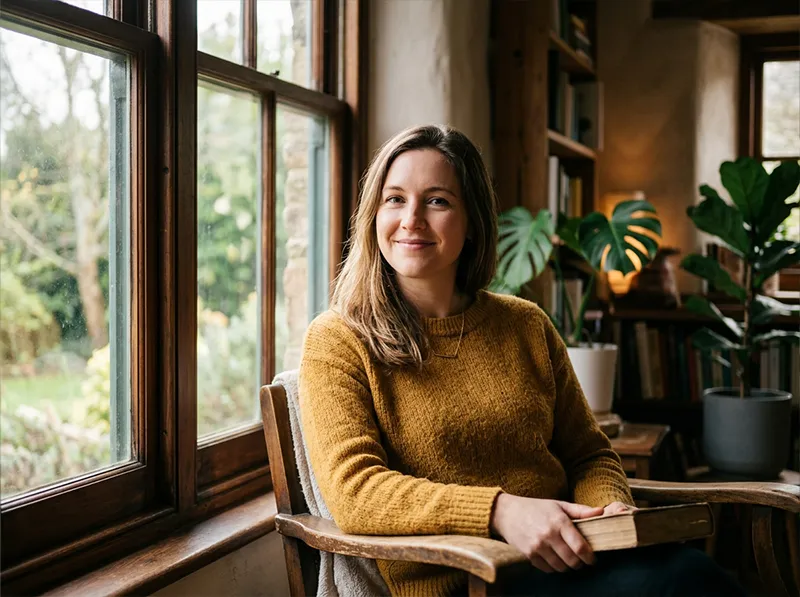
Indoor Window Light
First choice: Fujifilm Pro 160C
Window light is directional, relatively cool, and mixes with ambient room light in complex ways. Pro 160C handles this combination better than most, it has a slight warmth that compensates for cool window light without going orange in the warmer parts of the room. Clean skin rendering with good shadow handling.
✅ Use it on: indoor natural light portraits, lifestyle sessions at home, newborn sessions in window light, any mixed indoor ambient and window light situation.
Second choice: Fujifilm Pro 400H
If the window light is clean and soft (north-facing, diffused), Pro 400H produces beautiful indoor portraits with its cool, pastel character. In warmer indoor conditions, push Temperature 100 to 200K to compensate.

Artificial and Mixed Light
First choice: Kodak Portra 800
Artificial light is warm and difficult, tungsten and LED sources push skin toward orange if the preset is already warm. Portra 800 was designed for this: it was the film professional photographers used at receptions, events, and indoor shoots because it was calibrated for the mixed and artificial light conditions of those environments. It handles the orange push of tungsten better than any other Portra stock.
Adjust after applying: pull Temperature down significantly under pure tungsten light (200 to 400K), the preset is calibrated for mixed light, not pure orange tungsten.
Second choice: Fujifilm Natura 1600
Natura 1600 was designed specifically for available light photography, no flash, indoor ambient, challenging mixed light conditions. Its high-ISO character means grain is inherent in the look, which works in low-light portrait contexts. Skin rendering is more neutral than Portra 800, which can be preferable under artificial light when you want clean rather than warm.

03.
Portrait Preset Quick Reference
| Condition | First Choice | Second Choice | Avoid |
| Golden hour, warm outdoor | Kodak Portra 400 | Kodak Portra 800 | Fuji Pro 400H |
| Open shade, diffused | Fujifilm Pro 400H | Agfa Portrait XPS 160 | Kodak Ektar 100 |
| Overcast, grey days | Fujifilm Pro 160NS | Kodak Portra 160 | Kodak Gold 200 |
| Indoor window light | Fujifilm Pro 160C | Fujifilm Pro 400H | Velvia 100 |
| Artificial and mixed light | Kodak Portra 800 | Fujifilm Natura 1600 | Kodak Ektar 100 |
| Studio, controlled light | Agfa Portrait XPS 160 | Kodak Portra 160 | Velvia 100 |
| Editorial, high-key | Kodak Portra 160 | Fujifilm Pro 160NS | TRI-X 400 |
04.
Skin Tone Corrections After Applying
Every preset needs minor skin tone corrections on some images. Here is what to look for and how to fix it.
Orange or yellow skin tones:
- Drop Temperature 100 to 200K
- In HSL panel, reduce Orange Saturation by 5 to 10 points
- If persistent, reduce Orange Hue by 5 points to shift orange toward yellow-orange
Grey or desaturated skin:
- Push Temperature 100 to 200K warmer
- In HSL panel, increase Orange Luminance by 5 points to brighten skin
- Check that shadows are not crushed, lift Blacks slightly
Magenta or pink cast:
- Push Tint slightly toward green (negative direction) in the White Balance panel
- In HSL panel, reduce Red Saturation by 3 to 5 points
Uneven skin tones (part of face warm, part cool):
- The light is mixed, adjust White Balance to match the dominant light source
- Use masking to apply separate adjustments to shadow and highlight areas of the face
05.
The Portra 160 vs 400 vs 800 Decision
Portrait photographers who shoot across multiple lighting conditions need all three Portra stocks in their library. Here is when to reach for each one.
Portra 160:
- Fine grain, slightly cool, controlled
- Best for: bright conditions, studio, editorial, high-key, bridal
- Grain becomes a limitation in low light, switch to 400 or 800
Portra 400:
- The default, versatile, warm
- Best for: most outdoor portrait conditions, golden hour, lifestyle, family sessions
- 90% of portrait situations
Portra 800:
- More contrast, more grain, designed for difficult light
- Best for: indoor events, reception light, mixed artificial and natural light, low-light outdoor
- The grain is part of the character, if you want grain-free, use 400 in better light
The Kodak Portra collection covers all three stocks plus additional variations in a single pack. The complete Kodak Lightroom presets collection includes every Kodak film stock.
06.
FAQ
Which portrait preset is best for dark skin tones?
Fujifilm Pro 400H and Agfa Portrait XPS 160 both render dark skin tones exceptionally well. The cooler, more neutral character of both stocks avoids the orange oversaturation that warm presets like Portra 400 can produce on darker skin in warm light. Kodak Portra 160 is also a strong choice for its neutrality. Apply with careful white balance adjustment rather than relying on the preset’s built-in warmth.
Can I use the same portrait preset for the whole shoot?
For most outdoor natural light shoots, yes, one preset with per-image exposure and white balance corrections is the right workflow. For mixed-light shoots (ceremony in shade, reception under artificial light), having two presets available (Portra 400 for outdoor, Portra 800 for indoor) and switching between them produces more consistent results across the gallery.
Do portrait presets work on all skin tones?
Well-built film stock presets handle a wide range of skin tones because they were calibrated on real film that was used on diverse subjects. They still require white balance adjustment per image. Generic warm portrait presets are often calibrated on light skin tones only and produce less consistent results on darker skin.
Which preset is best for newborn photography?
Fujifilm Pro 160C and Agfa Portrait XPS 160 are both well-suited for newborn work. Both produce very soft, clean skin rendering with controlled contrast, the right character for the gentle, warm aesthetic most newborn photographers use. Avoid high-contrast stocks like Portra 800 or Ektar 100.
What is the best portrait preset for the Fuji X series cameras?
Any Fujifilm film preset tends to match well with Fuji X cameras because the camera’s color matrix is closer to Fuji film stock color science. Pro 400H and Pro 160NS particularly complement the Fuji X color rendering. Portra 400 also works well across all camera brands.
Browse the complete Kodak Lightroom presets collection and the full Fuji Lightroom presets range. For a broader overview across all photography genres, see our guide to the best Lightroom presets for photographers.
Related Articles
- The Best Lightroom Presets for Photographers in 2026
- Best Lightroom Presets for Wedding Photography
- Kodak Portra 160 vs 400 vs 800: Which Preset Do You Actually Need?
- How to Get the Best Results from Lightroom Presets
- What Are Lightroom Film Presets? The Definitive Guide
Richard is a commercial and editorial photographer with over 15 years behind the lens. He’s shot on film and digital across three continents, and still keeps a Nikon F3 loaded with Kodak Portra on his desk. At LegendaryPresets, he leads preset development – studying actual film scans to make sure every stock behaves like the real thing.